[iOS 27] Get Siri AI in the European Union

Here is a step-by-step guide, how to get the full potential of Apple Intelligence in the EU.

Works for the following versions:

  • iOS 18.1 or newer
  • iPadOS 18.1 or newer

1. You need an Apple Account outside the EU

To use the full potential of Apple Intelligence you need an Apple Account located outside of the EU. I choose the US.

You have two options:

  1. Change the App Store region in your main Apple Account Infos here:
    Change your Apple Account country or region - Apple Support
  2. Simply create a second Apple Account here.

To verify your account, you need a billing address located in the US and a payment option.

For the Billing Adress you can use the address of the Apple Park

1 Apple Park Way
Cupertino
95014-0642
United States

If you create a new account, you can choose ‘No Payment Method’[1]
If you used your main account, you need to update your payment methods to ‘None’[2]

WARNING:

Please note, that your current subscriptions no longer work, if you change the App Store region or remove any payment method.
If you use a new Apple Account, your “old”/main Account still gets charged for current subscriptions. New subscriptions charge the new Account.


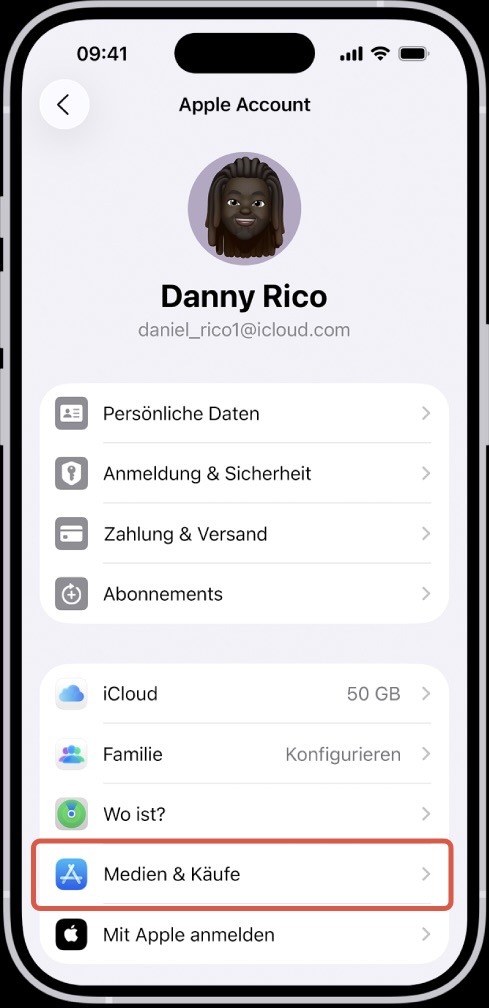
2. Change App Store Account (if needed)

If you created a new account in the previous step, change your App Store Account in the Settings to your new Apple Account.

[3]

3. Change Device Language

Change your language in the Settings app on your iPhone/iPad to English (US).
English (US) needs to be at the top. Make sure to choose the American version.
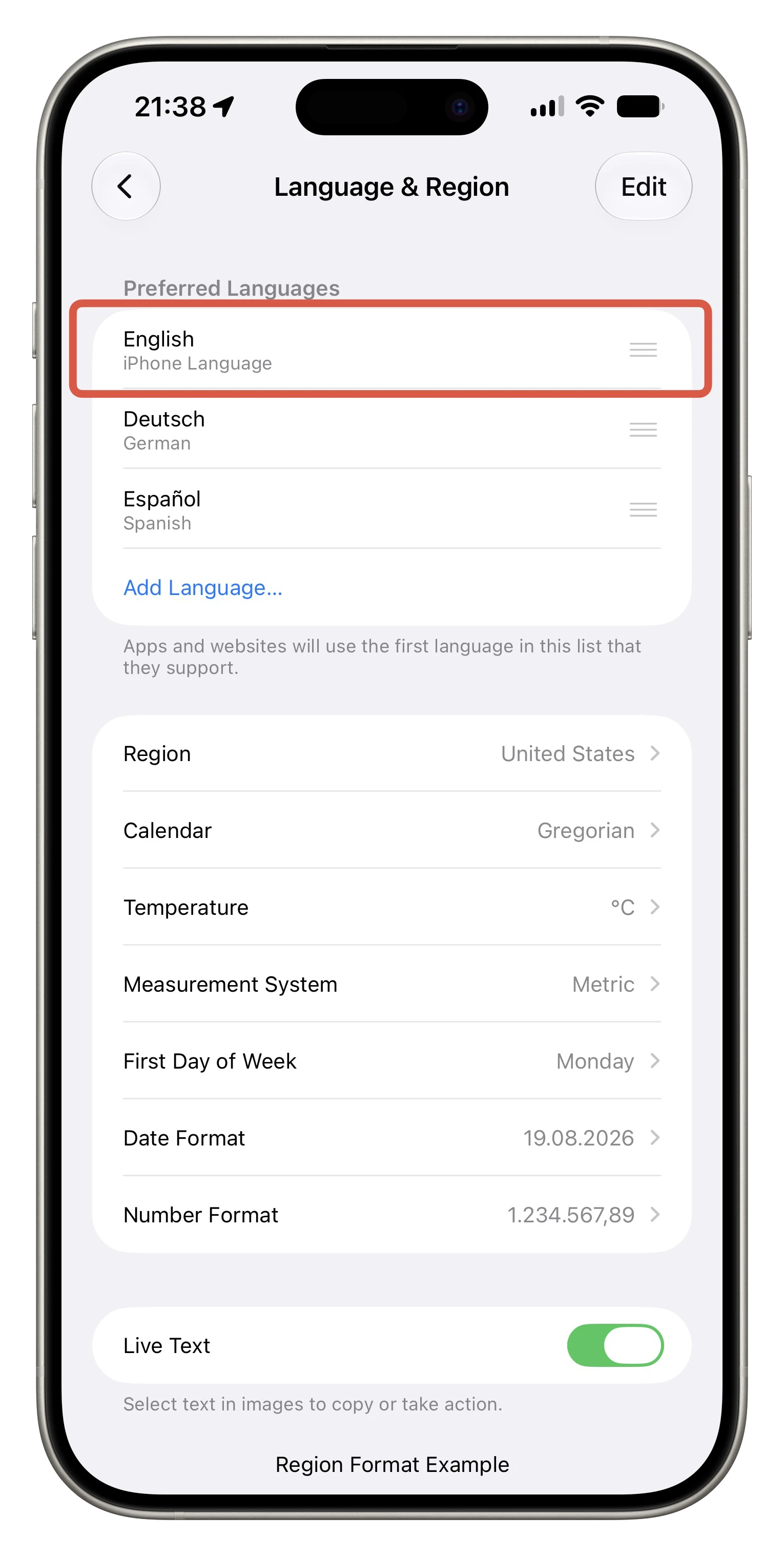
[4]


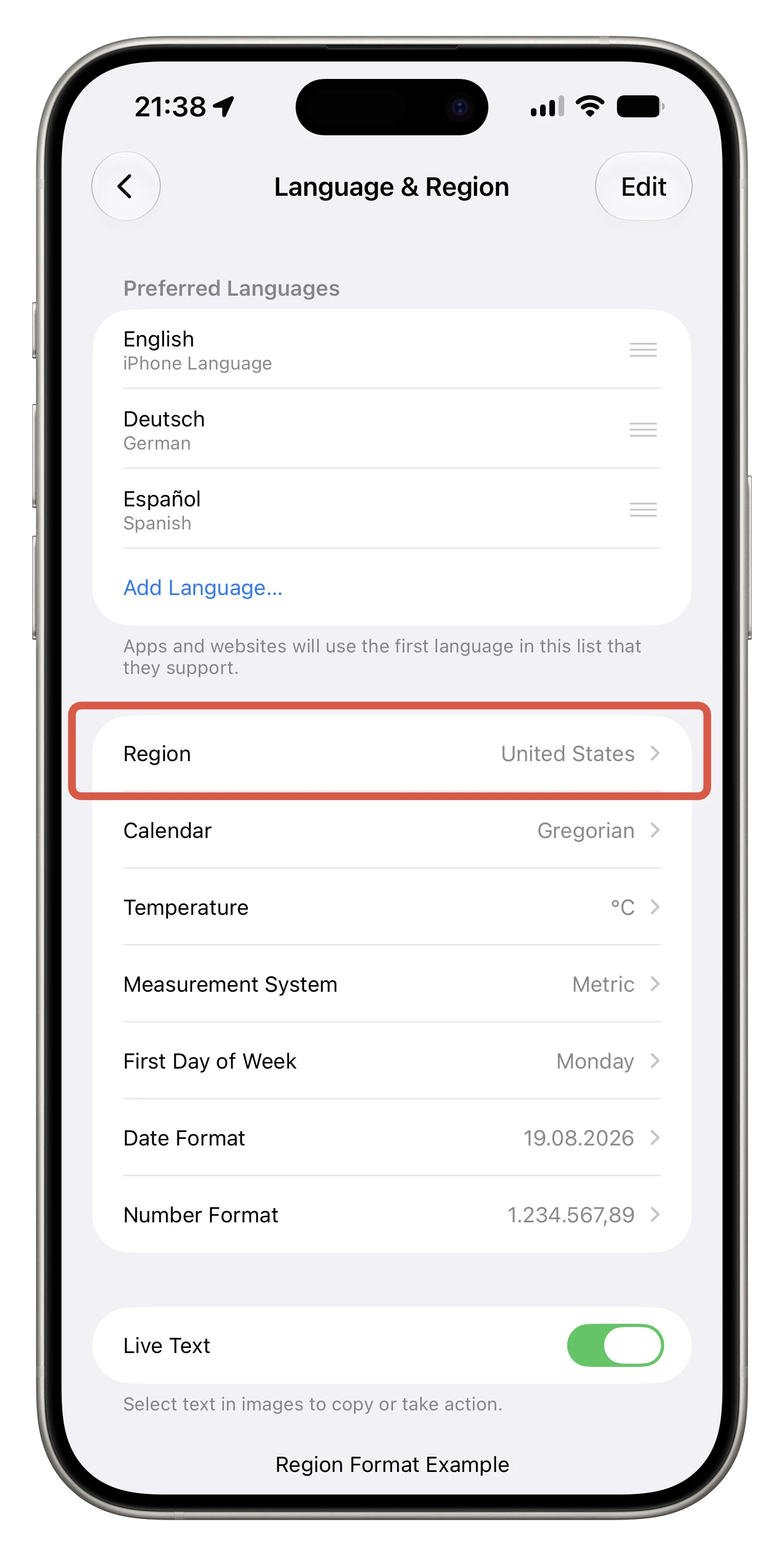
4. Change Device Region

Change your region in the Settings app on your iPhone/iPad to United States.

[5]

Activate Apple Intelligence

You’re done :grinning_face:. You can now join the waitlist (if required) to access the full potential of Apple Intelligence, and you can try Siri AI.


Hope this helps a little bit…

Have some patience.. it may need some time, until Siri AI is available for you. It took 3 days for me..


Other informations

This also enables call recording.

Please note that if your switching from an EU-Account, some EU-exclusive features might stop working.


  1. I did this two years ago. I hope this option still exists. ↩︎

  2. This option existed two years ago. I hope they didn’t removed it.. ↩︎

  3. Image Credit: apple.com ↩︎

  4. Own screenshot, edited with mockuphone.com ↩︎

  5. Own screenshot, edited with mockuphone.com ↩︎

3 Likes

Are there any disadvantages to doing that? For instance, will any features that were working in my region stop working if I do this?

1 Like

Welcome to the community @MakZak!

If you’re an EU citizen, some EU-exclusive, due to the DMA, features might stop working.

I figured out, that you can only pay with Apple Pay. Third-party payments, like PayPal, will no longer work (even if the settings app, shows it is activated)

1 Like

Thank you @KingDando for the warm welcome! I appreciate your work and the great post. I have a question for you. If I follow all these steps and enable the full Apple Intelligence, will I also be able to record phone and FaceTime calls? Have you tried that and found it to be working?

2 Likes

Yes you also get Call Recording. But I don’t know if FaceTime even has this feature to record calls… but you can record your phone calls.

2 Likes

Hi there, I have a second apple account located in the US or at least outside of the EU (I’m not sure anymore), and I logged in with it for App Store purchases etc. and also done all the other steps you explained. But I’m still just getting the basic old Apple Intelligence Siri. Do you know what the problem is?

1 Like

Welcome to the community @MakZak!

2 Likes

Thanks for the quick reply!

I’m using an iPhone 17 and yes, I have access to Apple Intelligence but I thought this post was referring to the new iOS 27 Siri AI which I wanted to get. So is there any way to get it even when I’m living in the EU (Germany, to be exact)?

2 Likes

Oh, you’re from Germany too! Well, so it is normal that after following all the steps the Siri icon is still the Apple Intelligence one and that I didn’t get the Siri app? I just need to wait?

1 Like

Good point. I’ve deleted the original post to avoid confusing anyone. The corrected information is already in the replies. Thanks again!

1 Like

Yep, that’s all true. The Siri app, the new icon, and everything comes when it’s ready.

1 Like

Yes, based on KingDando’s experience, it seems that you may simply need to wait. He mentioned that Siri AI took around three days to become available after completing the setup.

In the meantime, keep the US account signed in under Media & Purchases, make sure both the device and Siri are set to the supported beta language, and leave the iPhone connected to Wi-Fi and power when possible. I would also avoid repeatedly signing out or changing the settings, as that might restart or delay the activation process.

If the Siri icon and Siri app still haven’t changed after several days, it may be worth asking @KingDando to compare the exact settings and beta version with yours.

1 Like

@YutengJiang Did you need to join the Siri AI Waitlist?

1 Like

Nope, didn’t even get the option to. For me it was just the usual Siri interface but in English.

1 Like

@KingDando Okay, so now I’ve changed my second apple account to US (had it set to Malaysia before) and followed all the other steps. Now I will wait a few days and see if it works. Thanks for your help!

1 Like

Ok that’s weird. Is there an option to enable Siri AI (Apple removed the “AI” hint, in a previous beta)?

Maybe you just need to wait..

Hi, will Siri actually remain available indefinitely with this method, or maybe disappear in some days?
Could I get my iCloud account banned or temporarily blocked by doing this? I mean, I just want to experience Siri AI until it will become officially available in the EU and wanted to know if this method is kinda “stable”

1 Like

I’m using this method since iOS 27 Beta 2 on my iPhone 15 Pro Max. It works perfect fine.

1 Like